Suggested Replies
At Balloon Bliss, Bella (the AI agent) handles the front line. When a customer needs a person — a complaint, a custom order — a teammate takes the chat over and replies themselves. Suggested replies keep the AI helping even then: it quietly drafts a reply the human can read, tweak, and send with one click, so agents move faster without losing the personal touch.
The draft is a private dry run. Nothing is sent to the customer and nothing is changed until the agent chooses to send it.
When a suggestion appears
A suggestion is drafted automatically when both are true:
- A human is handling the chat — someone took it over from the AI (see Chat Actions).
- The customer sends a message.
The moment that happens, the AI reads the conversation and prepares a draft in the background. You'll see the ✨ sparkle button light up in the message box.

Suggestions are for human agents working real customer chats. They never appear in the Playground (that's you testing the AI), and the customer never sees them in the web chat.
Using a suggestion
The sparkle lights up only when the newest message is a customer message you haven't answered yet. Click it to open the draft:
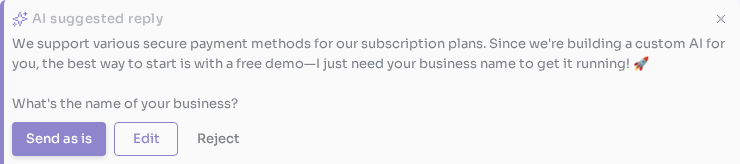
You have three choices:
| Action | What it does |
|---|---|
| Send as is | Sends the draft to the customer exactly as written. |
| Edit | Drops the draft into your message box so you can adjust the wording before sending. |
| Reject | Dismisses the draft — you'd rather write your own reply. |
The sparkle greys out once you've replied, and lights up again the next time the customer writes.
Reject is reversible
Reject is a soft dismiss, not a delete. The draft stays available — click the sparkle again to bring it back and Send or Edit it after all. It only goes away for good once you send a reply of your own to that message.
What the AI can do while drafting
This is the important part: writing a suggestion is a dry run. While drafting, the AI reads freely but acts on nothing.
- It can look things up — searching your knowledge base and any read-only tools to ground the draft in real answers.
- It will not take any action on the conversation: no handover, no resolve, no updating the customer's profile, no sending media, and no running workflows. Any tool that changes data is held back.
| Available while drafting | Held back while drafting |
|---|---|
| Knowledge-base search | Handover · Resolve |
| Read-only custom tools | Update customer · Send media |
| Product / order lookups (read-only) | Any tool that changes data · Workflows |
A suggestion must be safe to throw away. If the AI could run a real action just to draft a reply — charge a card, create an order, message the customer — rejecting the draft would leave that side effect behind. So a held-back tool simply returns a short "unavailable while drafting" note, and the AI writes the draft without it. The customer is never contacted and no record changes until you send.
Controlling which tools it can use
Whether a tool is available while drafting comes from one switch on the tool itself: This tool changes data, on the tool's form (Integrations → Tools, or Agents → your agent → Tools).

Tools that change data (create orders, update records, send anything to the customer) are excluded when the AI drafts reply suggestions for human agents. Turn this off only for purely read-only tools.
This switch is on by default — a tool is assumed to change data unless you say otherwise. So a new or unreviewed tool is automatically kept out of suggestions until you confirm it's safe. Turn it off only for tools that purely read (a lookup, a status check, a search) — those stay available while the AI drafts. See Creating Tools for where the switch lives.
When a suggestion can't be drafted
Sometimes a customer message trips the agent's safety guardrails (for example, an attempt to manipulate the AI). When that happens the banner shows a short warning instead of a draft, and nothing is saved — read the message yourself and reply in your own words.
Troubleshooting
The sparkle is greyed out. It lights up only when the newest message is an unanswered customer message and you are the chat's current handler. If your own reply (or the AI's) is the last message, or you haven't taken the chat over yet, it stays grey.
I don't see it at all. Suggestions only appear on real customer chats you're handling — not in the Playground, and not on a chat still handled by the AI.
I sent two messages quickly and only got one draft. That's expected. When a customer fires several messages in a row, the AI collapses them into a single draft for the newest message, so you get one complete reply instead of several half-answers.
A draft ignored a tool I expected it to use. That tool is marked as changing data, so it's held back while drafting. If it only reads, turn off This tool changes data on the tool.
Next Steps
- Chat Actions — taking over a chat, transferring, and resolving
- Sending Messages — the message box and message types
- The Support Role — a focused workspace for human agents
- Creating Tools — building tools and the changes data setting