Authentication for API Tools
Most real APIs need credentials. Orki's Authentication providers let you store a credential once and attach it to any API tool or workflow step. On every call, Orki injects the credential on the server, just before the request leaves the platform.
The important part: the AI agent never sees the credential. It isn't in the tool schema, the prompt, or the response the agent reads. Secrets are encrypted at rest and become write-only once saved.
For Balloon Bliss, the shop's order API requires an API key — we'll store it as a provider called balloon_orders_key and attach it to the order_status_lookup tool.
Where to Find It
Integrations → Authentication in the sidebar.
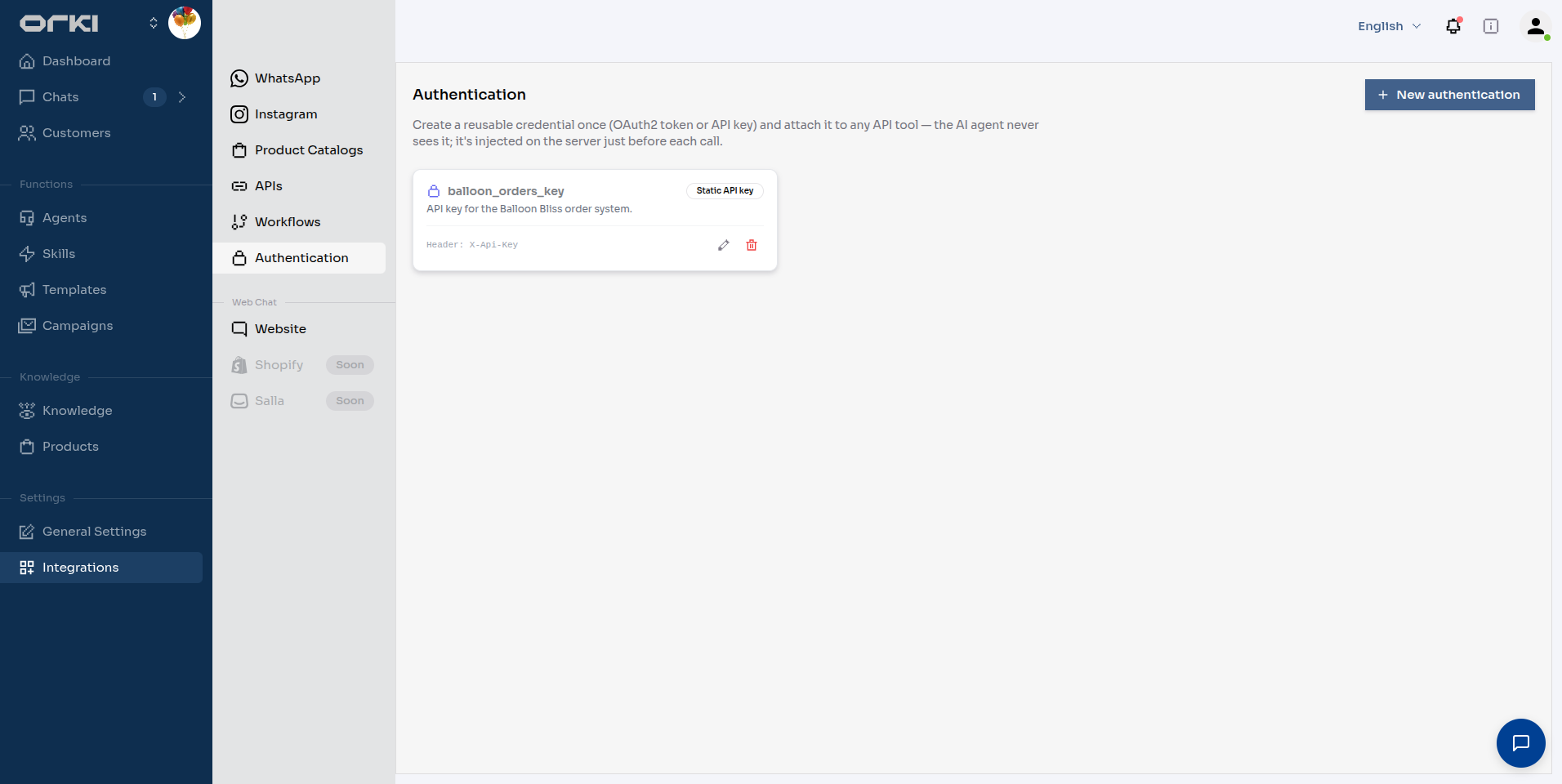
Each card shows the credential type and where it's injected. Click New authentication to create one.
Three Credential Types
| Type | How it works | Use it for |
|---|---|---|
| Static API key | A fixed secret injected into a header or query parameter on every call. | X-Api-Key-style APIs, personal access tokens. |
| OAuth2 client credentials | Orki exchanges your client ID + secret for a bearer token at the provider's token URL, caches it, refreshes it before expiry, and injects Authorization: Bearer …. | Partner APIs with an OAuth2 client_credentials flow. |
| WS-Security (SOAP) | A <wsse:Security> UsernameToken is inserted into the SOAP envelope header of every call. | Legacy SOAP services — banking cores, telco provisioning, ERP endpoints. |
All three start the same way: a Name (snake_case, internal only — the agent never sees it) and an optional Description.
Example 1 — Static API Key
- Name —
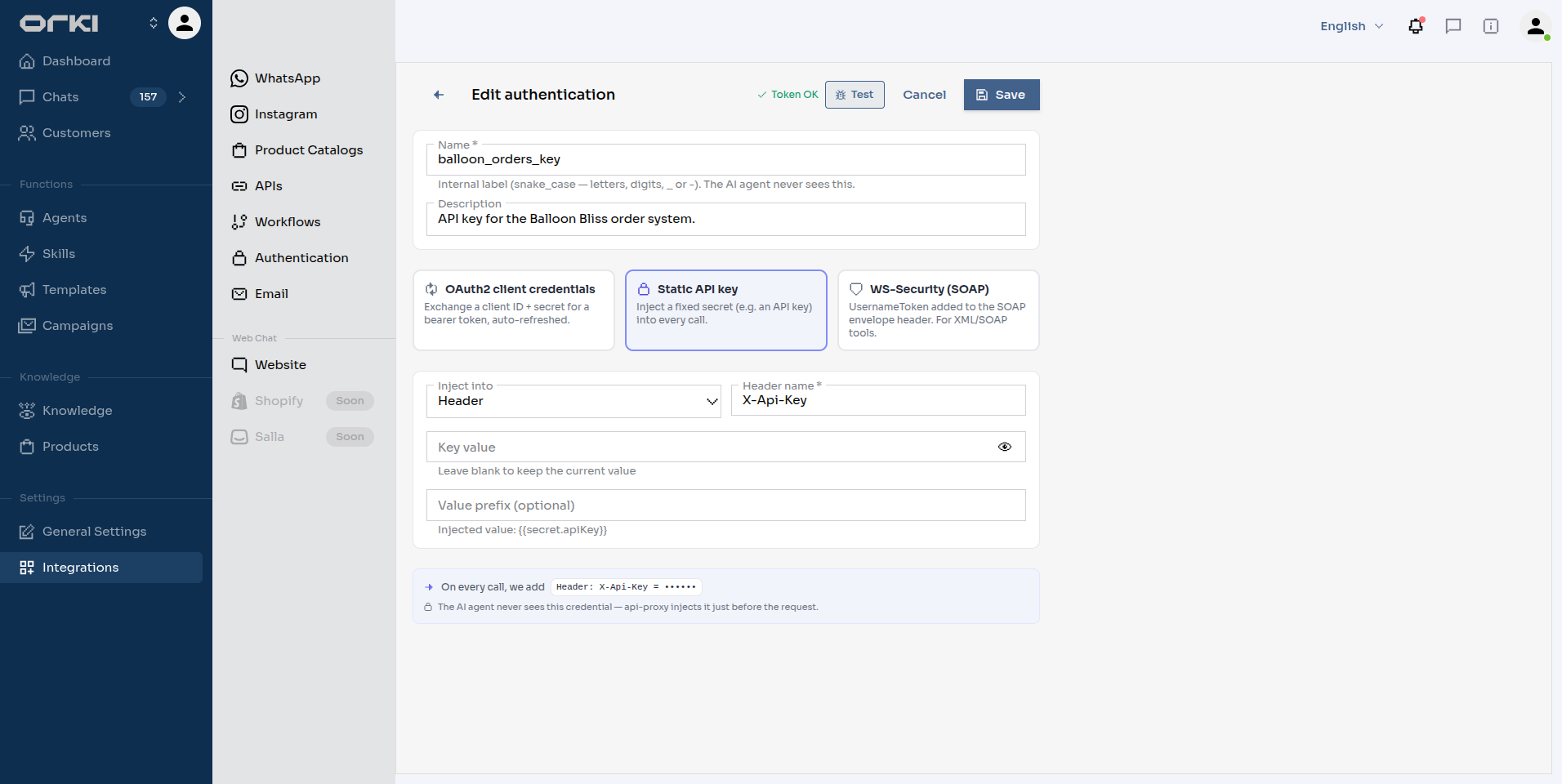
balloon_orders_key. - Pick the Static API key card.
- Inject into —
Header, Header name —X-Api-Key. - Key value — paste the secret.
- Optional Value prefix — e.g.
Bearerif the API expectsAuthorization: Bearer <key>.
The helper under the prefix field shows the resolved template live, and the preview at the bottom shows exactly what will be added to each call.
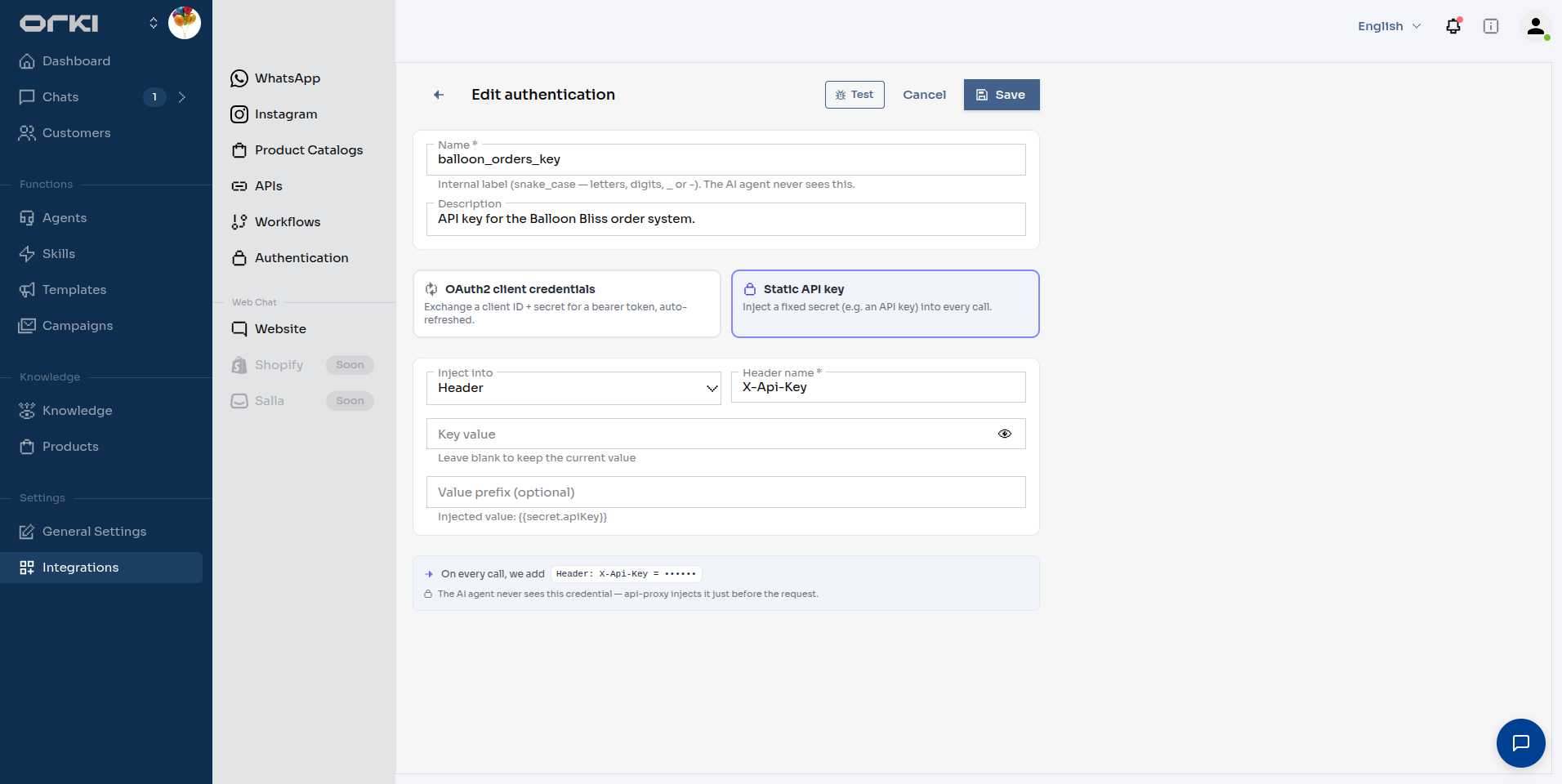
Click Save.
Example 2 — OAuth2 Client Credentials
Say Balloon Bliss later integrates a shipping partner whose API uses OAuth2:
- Name —
shipping_partner_oauth, pick the OAuth2 client credentials card. - Token URL — the partner's token endpoint (e.g.
https://api.shipping-partner.example/oauth/token). - Client ID / Client secret — from the partner.
- Scope (optional) — space-separated, e.g.
shipments.read shipments.write. - Send credentials as —
Form(default) orJSON, matching what the token endpoint expects.
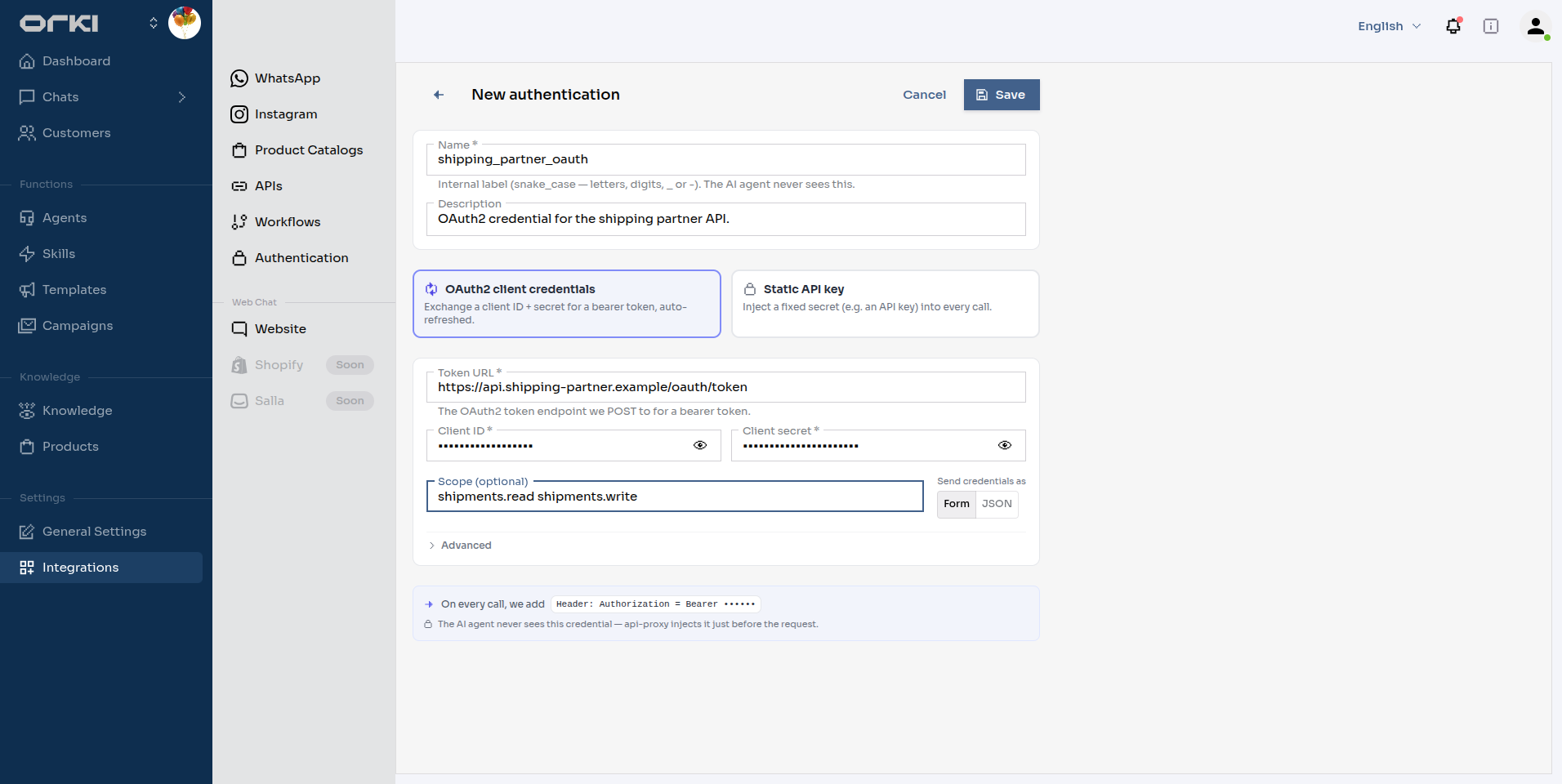
Tokens are fetched, cached and refreshed automatically — your API tools never deal with expiry.
The Advanced section
The defaults fit a standard OAuth2 provider. Open Advanced when yours isn't standard:
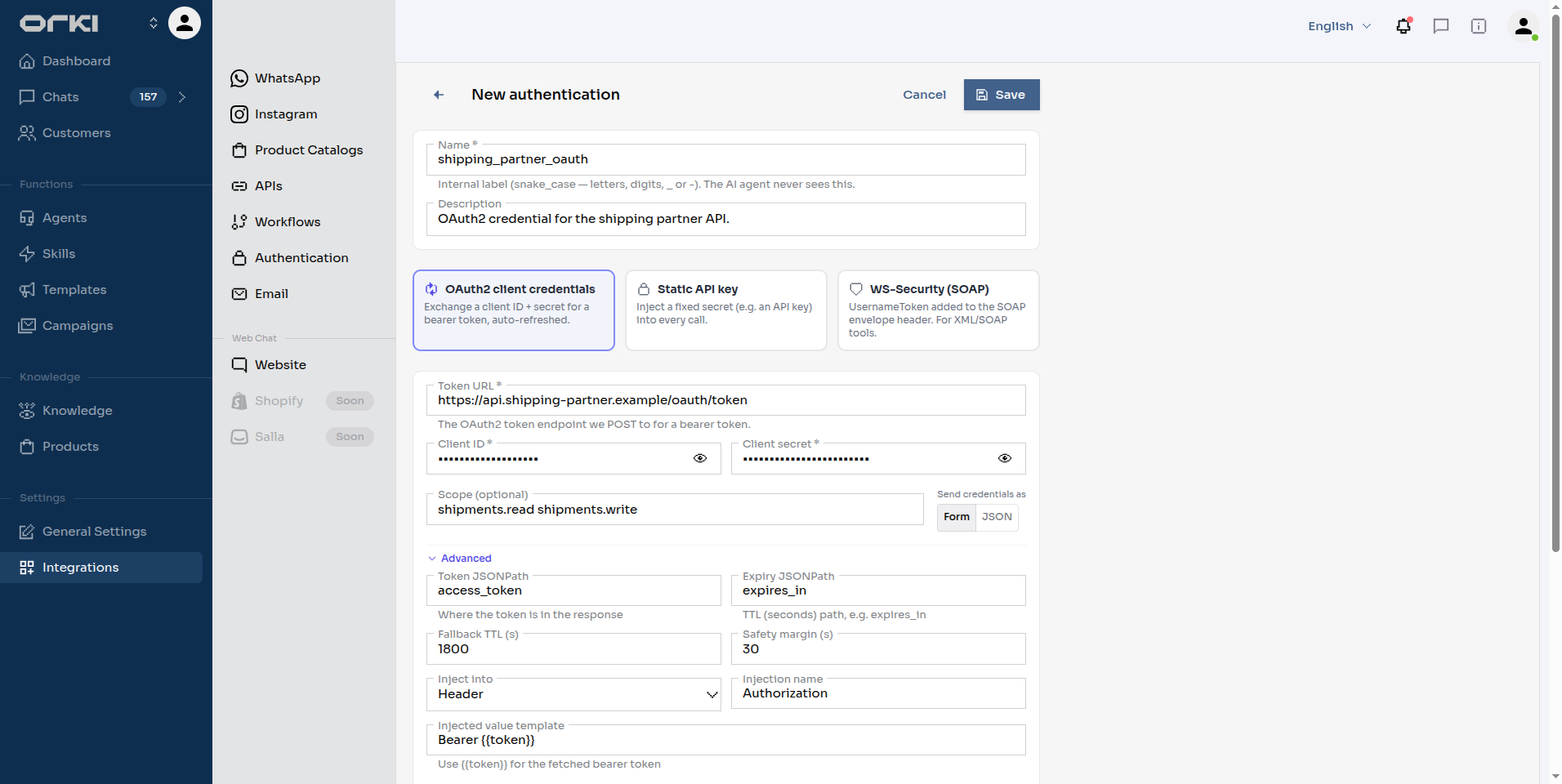
| Field | What it's for | Default |
|---|---|---|
| Token JSONPath | Where the token sits in the response. | access_token |
| Expiry JSONPath | Where the lifetime (in seconds) sits. | expires_in |
| Fallback TTL (s) | How long to cache when the response carries no usable expiry. | 1800 |
| Safety margin (s) | Shaved off the lifetime so a token can't expire mid-request. | 30 |
| Inject into / Injection name | Where the token goes on the outgoing call. | Header / Authorization |
| Injected value template | The value written into it. Must contain {{token}}. | Bearer {{token}} |
| Extra token-request headers | Added when fetching the token — e.g. Accept: application/json. | none |
| Custom token-request body | Replaces the generated body entirely. Use it for non-standard parameters like audience. Reference your secrets as {{secret.clientId}}. | none |
| Refresh token + retry once on a 401 | On a 401 from your API, discard the cached token, fetch a fresh one and retry the call once. | on |
Authentication Reference documents the exact request Orki sends, the fields it reads back, and the caching and retry rules — written for the engineer who owns the API being called.
Example 3 — WS-Security (SOAP)
For a SOAP service that expects a UsernameToken:
- Name it, then pick the WS-Security (SOAP) card.
- Username and Password.
- Open Advanced if the service is picky:
| Field | What it's for | Default |
|---|---|---|
| Password mode | PasswordText sends the password as-is (most common). PasswordDigest sends a hashed digest with a fresh nonce and timestamp instead — nothing reusable crosses the wire. | PasswordText |
| Include timestamp | Adds a wsu:Timestamp with a created/expires window. | on |
| Timestamp validity (s) | Length of that window. Accepted range 30–3600. | 300 |
mustUnderstand="1" on the Security header | Tells the service it must process the header or reject the message. | on |
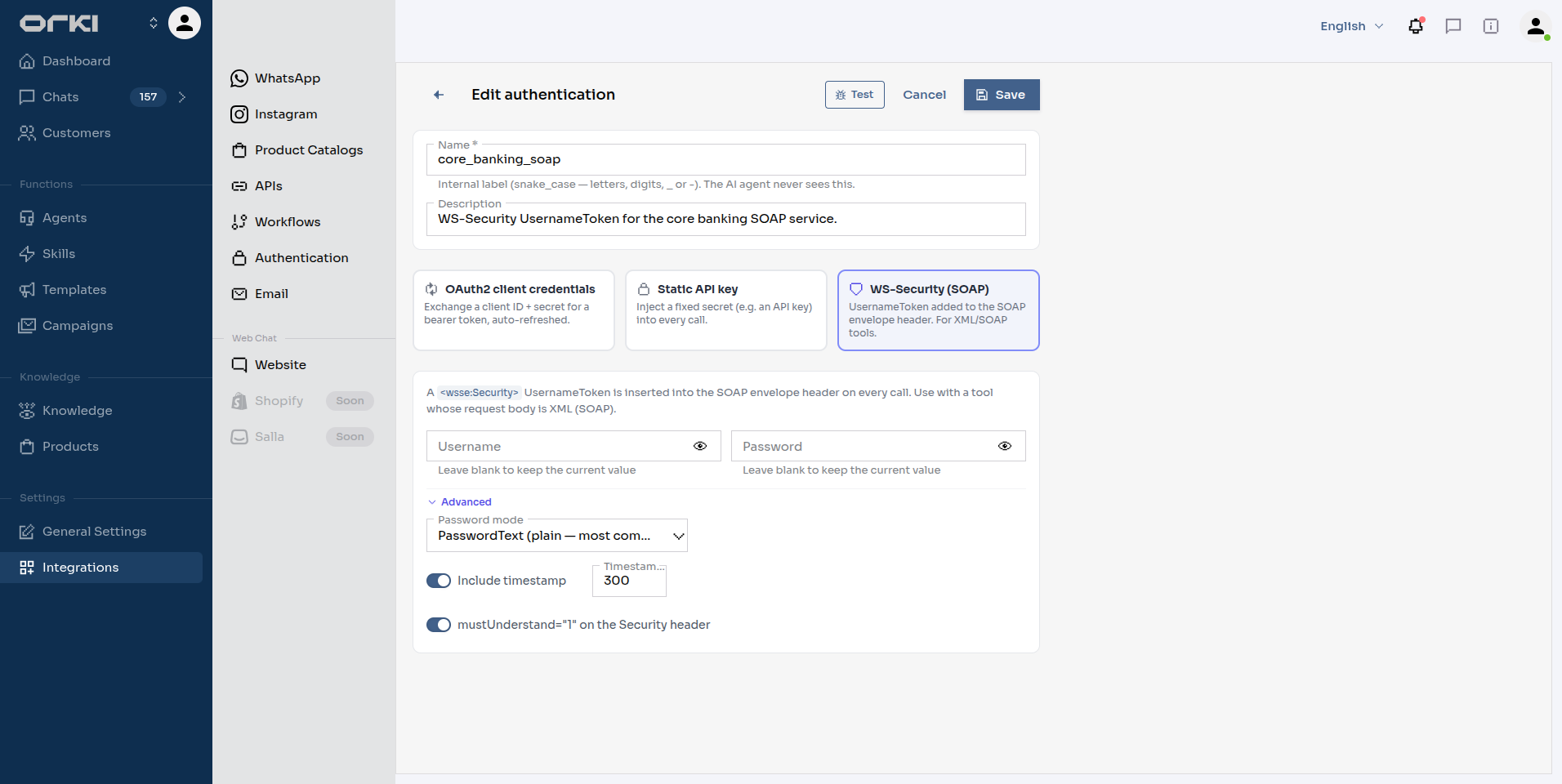
This type injects into the SOAP envelope, not into a header or query parameter. The tool you attach it to must use the text/xml (SOAP) body type and send a valid soapenv:Envelope — SOAP 1.1 or 1.2. Attached to a JSON tool, the call fails with "WS-Security requires a SOAP XML request body."
Because the credential goes into the body, the Inject into / Injection name fields don't apply and aren't shown.
Testing a Provider
Save the provider first, then reopen it — the header gains a Test button.
| Result | Meaning |
|---|---|
| Token OK | Static key or WS-Security: the stored secrets decrypt correctly. |
| Token OK · expires … | OAuth2: Orki really called your token endpoint and got a token back. |
| A red error line | The message came from your provider. See Troubleshooting. |
There's no Test button while creating one. Save, reopen from the list, then test. On reopening, secret fields show •••••• (unchanged) — leave them blank to keep the stored value.
Attaching to a Tool
Open the tool (Integrations → APIs, then edit it) and scroll to the Authentication section — it sits just below Headers, above the request body.

The dropdown reads None — no authentication by default. Pick your provider and save.
That's it. Every execution of this tool — whether the agent calls it directly or a workflow step runs it — now goes out with the credential injected. One provider can back any number of tools, and rotating the secret in one place updates them all.
The + New link beside the dropdown opens the provider form as a full page. Your half-filled tool is kept as a draft, but it's smoother to create the provider first and then build the tool.
In the workflow builder, a tool node that carries a provider shows a small green lock icon.
Security Notes
- Secrets are encrypted at rest and decrypted only at the moment of the outbound call.
- Once saved, a secret is write-only. Reading a provider back — in the UI or over the API — returns
********, never the value or its encrypted form. - The agent-facing tool schema and results contain no trace of the credential, so a prompt-injection attempt can't ask the agent to reveal what it never had.
- Prefer a provider over pasting keys into a tool's header fields. Header values sit in the tool config in plain sight; provider secrets don't.
- Token URLs must be public domains. IP addresses and
localhostare rejected.
Troubleshooting
| Symptom | Cause | Fix |
|---|---|---|
Test says Token endpoint returned HTTP 401 | Client ID or secret wrong, or the endpoint wants them somewhere else. | Re-enter both. If the provider expects HTTP Basic rather than form fields, see the reference. |
Test says TokenPath 'access_token' not found | The token isn't at the default path. | Set Token JSONPath in Advanced to match the real response, e.g. data.token. |
| Test says the response is not valid JSON | The token endpoint returns XML or form-encoded data. | Orki's OAuth2 type requires a JSON token response. |
| Tool calls return a server error, but Test passes | Something else in the tool is failing. | Use the tool's own Test drawer — it shows the pipeline stage and the underlying message. |
| 401s from the API even with a valid token | The scheme is wrong. | Check Injected value template — some APIs want Token {{token}}, not Bearer {{token}}. |
| Calls worked, then started failing | Client revoked, or secret rotated at the provider. | Re-enter the secret and hit Test. Orki fetches a fresh token automatically once the cached one is rejected. |
| SOAP service rejects the envelope | Wrong password mode, or a clock/timestamp issue. | Try PasswordDigest, and widen Timestamp validity. |
| Which tools use this provider? | — | Check each tool's Authentication section. Deleting a provider that's still attached breaks those tools' calls. |
Next Steps
- Authentication Reference — the exact contract, for the team that owns the API
- Creating API Tools — build the tools that use these credentials
- Building Workflows — chain authenticated tools into flows